
indra CLI
Agent console
indra serve: view and edit agents, watch runs, launch agents and follow them live.
cd ~/code/indra                       # or any project; see "Profiles" below
indra serve --target ~/code/my-api    # the codebase whose runs to watch and where agents run
indra 0.1.0
harness indra (~/code/indra/plugins/indra)
harness claude-code (~/code/indra)
runners claude
Open: http://127.0.0.1:7878/?token=3f9c...
(the token in this URL is the password; keep it private)Open the printed URL once. It exchanges the token for a cookie and you are in. Add --open to
open the browser for you, --read-only to turn off launching and editing.
| Page | What it shows |
|---|---|
| Agents, Skills, Prompts | Everything a harness is made of, with model, tools and description. Open one to read, edit, download or delete it, and see what it uses and is used by; create a new one from a template or import .md files (they go where the harness's first simple pattern points, like agents/*.md). A save is refused if the file changed since you loaded it. |
| Graph map | Pipeline stages run agents, agents spawn agents and invoke skills (a family reference such as sh-kb-* loads every member), and everything reads its prompts. |
| Knowledge | The indra mem vaults the harness reads and writes: search, read, edit, link and delete notes, the graph, and its health (dangling links, orphans). Also the learnings inbox: what agents proposed they learned, to accept into memory or discard. See Context, memory and learnings. |
| Runs | Each run directory, live: stage progress, results per agent or class, status and severity counts, and every file the run wrote. Refreshes every 3 s. Start a pull request review from here; on a run, triage its findings, compare it with an earlier run, record it into memory, publish it or post it. See Reviewing pull requests from the console. |
| Marketplace | Plugins, skills and agents from Claude Code plugin marketplaces (Anthropic's built in, add your own) and skill repositories: look inside, install for Claude Code, Codex or a harness, or as a Claude Code plugin; update and remove. See Marketplace. |
| Plan and delegate | Under Launch: a planner profile writes a plan, you review and edit it, worker profiles (cheaper or local models) carry out each step, a reviewer checks the result; cost per role. See Plan and delegate. |
| Launch, Processes | Start an agent through a runner and follow it. With Claude Code you see every subagent it spawns, each subagent's own tool calls, refused permissions, the final cost, how full its context window is, and the memory it started with. Stop ends the whole process tree. |
| Board | Work items in columns, run by agents with a profile, imported from and reported back to Jira, GitHub Issues or ClickUp. Items can be edited and removed, and the board exported to or imported from JSON. See the board guide. |
| Terminal | A real terminal in the browser (with indra serve --shell): your shell or Claude Code in a target, or an agent's own session. See Terminals. |
| Settings | Everything in indra.toml, edited in the browser: runners, nodes, workflows, presets, harnesses, the agents-at-once limit, and the file itself as text. Each section exports to and imports from JSON (same names are replaced after you confirm); the File tab downloads indra.toml or loads one to check and save. Secret values never leave. See Settings. |
The same picture without a browser:
indra ls --defs        # harnesses, every agent/skill/prompt, recent runs with stage progress
indra check            # globs that match nothing, unknown stage agents, missing runners
Profiles
A profile tells indra where a harness keeps its parts. Two are built in and detected automatically:
| Profile | Found when | Agents | Skills | Prompts | Runs |
|---|---|---|---|---|---|
indra | you run inside this repository, or the indra plugin is installed under ~/.claude/plugins | agents/*.md | skills/*/SKILL.md | references/* | <target>/.security-harness/{run,pr}-*, stages recon -> hunt -> chain -> verify -> report |
claude-code | the project or ~/.claude has agents, skills or commands | .claude/agents/*.md | .claude/skills/*/SKILL.md | CLAUDE.md, AGENTS.md, commands | - |
A custom harness is a few lines of TOML, in indra.toml (current directory), then
~/.config/indra/indra.toml, or --config FILE. indra init writes a commented starter, and
the console's Settings page edits all of it.
[[harness]]
name     = "research-agents"
root     = "."
agents   = ["agents/*.md"]
skills   = ["skills/*/SKILL.md"]
prompts  = ["prompts/**/*.md"]
memory   = ["{target}/.memory"]         # memory vaults; {target} expands per target
targets  = ["../project-a"]
runs     = ".runs/*"                    # one directory per run, under each target ({a,b} for alternatives)
findings = ["results.jsonl"]            # JSONL results inside a run
group_by = "agent"                      # which field names the agent that produced a result
stages   = [
  { name = "plan",     agent = "planner",    done_when = "plan.md" },
  { name = "research", agent = "researcher", done_when = "results.jsonl" },
  { name = "write",    agent = "writer",     done_when = "report.md" },
]
Globs support *, ?, **, ~/ and absolute paths. Agent and skill files are Markdown with
optional frontmatter (name, description, model, tools or allowed-tools), the format
Claude Code uses. A stage is done once its done_when file exists; while a run is live, the
stage whose file changed last is shown as running. Graph edges come from the files
themselves: if planner.md mentions researcher, the planner spawns the researcher.
Runners
A runner is how indra starts an agent. Built-in runners are shown when installed:
| Runner | Command | Live view |
|---|---|---|
claude | claude -p {prompt} --output-format stream-json --verbose | text, every tool call, subagent spawns and results, permission refusals, cost |
codex | codex exec {prompt} | output lines |
gemini | gemini -p {prompt} | output lines |
[[runner]]
name    = "claude-edits"
command = "claude"
args    = ["-p", "{prompt}", "--output-format", "stream-json", "--verbose", "--permission-mode", "acceptEdits"]
format  = "claude-stream-json"          # or "text"

[[preset]]                              # saved prompts on the Launch page
name    = "Nightly quick review"
harness = "indra"
runner  = "claude"
prompt  = "/sh-security-review {target} depth:quick"
The agent runs in the chosen target with your user's permissions and your agent CLI's own
permission settings (for Claude Code, .claude/settings.json); indra does not loosen them.
Stop sends SIGTERM to the runner's process group (Windows: ends the process tree) and kills it
after 5 s. Output is kept in memory for the live view and written to logs/ in the indra data
directory.
Settings
Everything the config file holds can be changed from the console, without a restart:
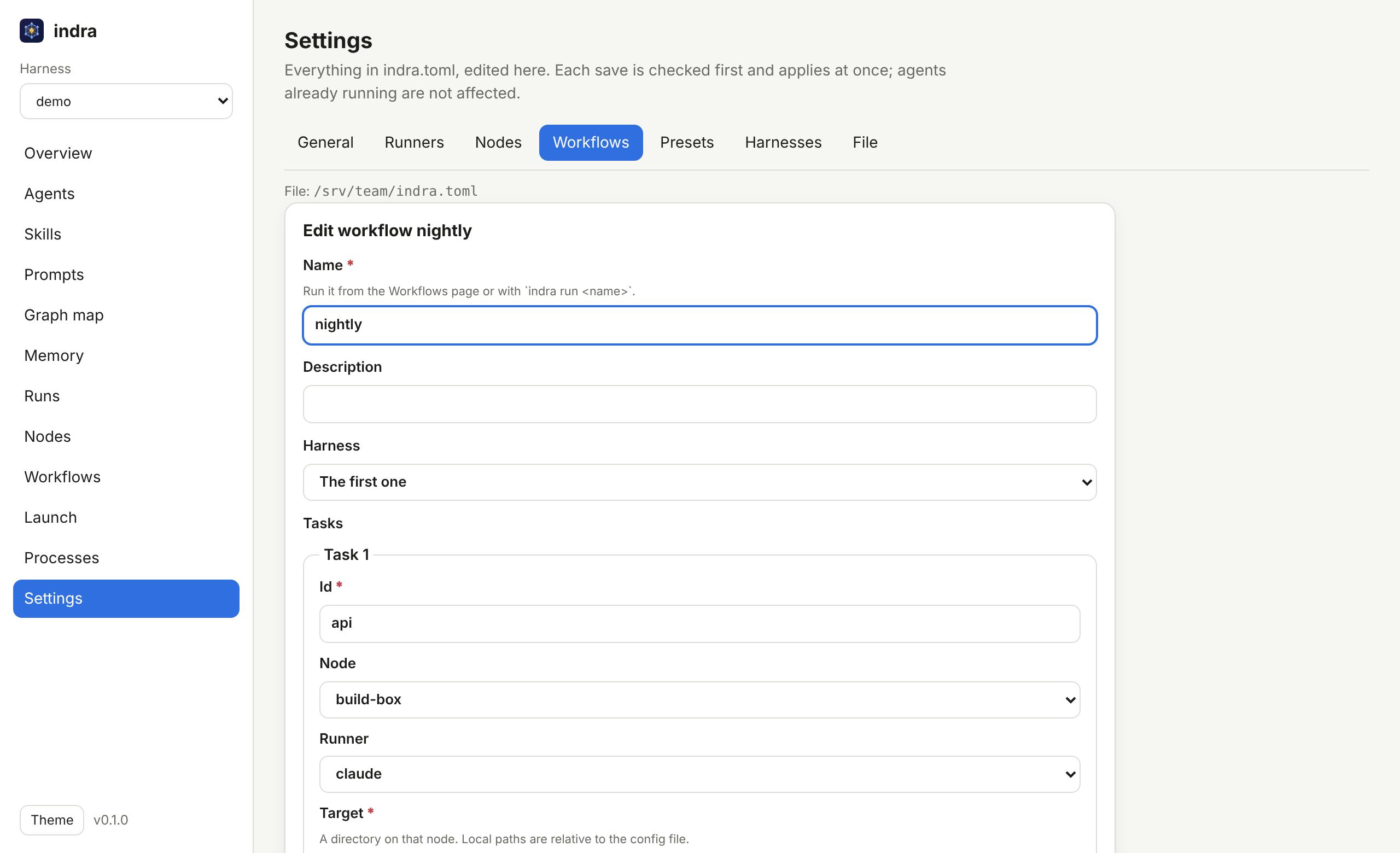
| Tab | What you set |
|---|---|
| General | whether the built-in profiles load, how many agents run at once on this machine, WebRTC for nodes that dial in and its STUN servers, and (for the next start) the listen address and read-only mode |
| Profiles | runner, model, where it runs (Anthropic or Ollama, or its subagents on Ollama), permission mode, tool rules, environment and secrets, memory and reflection; templates included |
| Runners | add, edit, duplicate or delete runners; Customize a built-in one (claude, codex, gemini) to change its arguments, including how it picks a model (model_args) |
| Nodes | remote machines: SSH destination (or none, for a node that dials in), port, key, capacity, targets |
| Workflows | workflows and their tasks: node, runner, profile, model and provider, component or sub-workflow, target, prompt, what each runs after, retries (the graph editor draws the same) |
| Components | reusable tasks a workflow task can start from |
| Presets | saved prompts for Launch (Launch also has Save as preset) |
| Teams | plan and delegate: the planner, worker and reviewer profiles |
| Marketplaces | Claude Code plugin marketplaces and skill repositories to install from |
| Harnesses | custom harnesses, or Customize a built-in profile |
| Connectors | Jira, GitHub Issues, ClickUp and Linear boards to import work items from and report back to (imports follow pages, up to 500 items) |
| Secrets | tokens agents and connectors use, encrypted, scoped to profiles and machines |
| File | the whole indra.toml as text, with Check before Save |
How a save works:
- Checked first. The new file is loaded exactly as
indra servewould load it (names unique, runners contain{prompt}, workflows have no cycles, SSH destinations are valid, ...). If it would not load, nothing is written and the page says why. - Applied at once. Launch, Nodes and Workflows use the new settings straight away. Agents that are running keep going as they were.
- Your file stays yours. A form rewrites only its own section: comments, order and formatting elsewhere in the file are kept, as is the comment above the section. Writes are atomic (a temporary file, then a rename).
- No lost edits. If the file changed on disk after the page loaded it, the save is refused and the page reloads the file.
- Where it is saved: the config file that was loaded, or
--config, or, if there was none, a new~/.config/indra/indra.toml(%APPDATA%\indra\indra.tomlon Windows). Relative paths in it are relative to that file's folder.
The listen address, read-only mode and --target are fixed while the console runs; they are
shown, and General saves the first two for the next start.
Security model
The console can start programs and rewrite prompts, so it is built like a remote shell:
- Loopback only by default. Binding elsewhere prints a warning.
- A token on every API call, random per start (or
--token/INDRA_TOKEN, 16+ characters), sent as anHttpOnly,SameSite=Strictcookie orAuthorization: Bearer, and compared in constant time. - Users and roles, for teams.
indra user add NAME(or Settings > Users) switches the console to sign-in with a name and password and three roles (viewer, operator, admin), checked by the server on every call, with an audit log of every change. The token then stays a key for tools only. See Users and roles. - No DNS rebinding. On loopback, a request whose
Hostis notlocalhost,127.0.0.1or[::1]is refused, token or not. - No CSRF. State-changing requests must be same-origin (
Origin,Sec-Fetch-Site) and JSON. - No shell. A runner's program runs directly with an argument vector and the prompt is a
single argument, so
; rm -rf ~in a prompt is just text. Runners come only from the config. - Settings are as powerful as a shell, and guarded like one. Defining a runner means choosing
a program to run, so editing settings needs everything above (token, same origin, loopback
Host) and is off when indra is
--read-only, when started with--lock-config, and when the console listens beyond this machine unless you also pass--allow-remote-config. - The browser terminal is opt-in. It is a shell on the machine, so it exists only when
indra serveis started with--shell, only on a loopback address and never read-only. On top of the token and Host checks, its WebSocket must come from the console's own origin (browsers apply no CORS to WebSockets), at most 8 are open at once, and each one is logged tologs/terminal.login the data directory. - Confined files. Prompts are read and written only if discovery found them; run files
resolve only inside their run directory (
.., absolute paths and escaping symlinks refused). - No injected markup. The UI renders every string with
textContent, under a strictContent-Security-Policywith nothing third-party. The terminal page alone allows inline styles, which xterm.js (vendored, MIT, served by indra) needs; scripts stay'self'.
Processes are tracked while indra serve runs. When it exits (Ctrl-C, SIGTERM, SIGHUP) it
stops every agent it started first; their logs stay on disk. See
Handling agent processes.
Agent control
An agent started through a Claude Code runner (format = "claude-stream-json") is driven over
Claude Code's control channel, the one the Agent SDK uses, so from its process page you can:
- Approve or deny tool requests. When the agent wants to run a tool its permission mode does not allow, the request appears under Waiting for you (and as a badge on Processes) with Allow, Allow always (adds Claude Code's suggested rule for the rest of the session) and Deny (with a reason the agent sees).
- Change its permission mode:
manual(ask for everything),acceptEdits,auto,plan(read and plan only),dontAsk(deny whatever would ask) orbypassPermissions. - Change its model for the turns that follow.
- Interrupt the current turn without ending the session.
- Send a follow-up message, answered after the current turn.
The prompt goes to the agent over stdin, and indra closes stdin after the last turn's result, so
the agent still exits when its work is done. Remote agents get the same controls: the hub forwards
them to the node. API: POST /api/procs/{id}/permission, /control and /message.
Profiles
A profile is a named way to run an agent: a runner with a model, permission mode, effort, tool rules and environment. Launch, presets, workflow tasks and fan-outs pick one, and model and mode can still be changed per launch or while the agent runs. Settings > Profiles has templates.
Built in, so nothing needs configuring: four Claude Code profiles and a team that uses them.
A [[profile]] or [[team]] with the same name replaces one (Customize in Settings), and
builtins = false turns them off.
| Name | What it is |
|---|---|
planner | Opus, high effort, read-only tools: reads and plans, changes nothing |
worker | Sonnet, accepts its own edits: does the work |
builder | Haiku, accepts its own edits: small, well-specified steps, cheaply |
reviewer | Opus, accepts its own edits: reviews and fixes small mistakes |
team plan-and-build | planner plans, worker builds, builder takes the light steps, reviewer checks |
[[profile]]
name            = "planner"
runner          = "claude"
model           = "opus"
permission_mode = "plan"

[[profile]]
name            = "worker"
runner          = "claude"
model           = "sonnet"
permission_mode = "acceptEdits"
allowed_tools   = ["Read", "Grep", "Glob", "Edit", "Bash(git diff:*)"]

[[profile]]
name     = "local"                   # Claude Code on a local model, through Ollama (0.14+)
runner   = "claude"
model    = "qwen3-coder"
provider = "ollama"                  # ollama_url = "http://gpu-box:11434" for another machine

[[profile]]
name              = "lead-local"     # Opus on Anthropic, its subagents on the local model
runner            = "claude"
model             = "opus"
subagent_model    = "qwen3-coder"
subagent_provider = "ollama"         # through indra's model router; no credential reaches Ollama

[[profile]]
name           = "lead"
runner         = "claude"
model          = "opus"
subagent_model = "haiku"             # Claude Code's own subagents run on Haiku (CLAUDE_CODE_SUBAGENT_MODEL)

[[profile]]
name    = "learner"
runner  = "claude"
memory  = true                       # start with the memory notes relevant to the prompt
reflect = true                       # propose learnings for review before finishing
For runners other than Claude Code, set model_args (e.g. ["--model", "{model}"]) to let a
profile choose the model (the built-in Codex and Gemini runners have it); permission modes and
tool rules are Claude Code's. Ollama works with Claude Code and Codex: see
Local models with Ollama. A workflow task can override its
profile's model and provider.
Secrets
Agents need tokens (a tracker's API, a cloud account, a model key). They never go in
indra.toml; a profile refers to one by name:
[[profile]]
name = "board-worker"
runner = "claude"
env  = { JIRA_TOKEN = "secret:jira" }
Set the value in Settings > Secrets, or on a machine without a browser:
printf '%s' "$TOKEN" | indra secret set jira --description "Jira API" --profile board-worker
indra secret list          # names, scopes and use; never values
indra secret rm jira- Encrypted at rest in the indra data directory (
secrets/vault.json, XChaCha20-Poly1305). The key isINDRA_SECRETS_KEY(64 hex characters) when set, so it can live off the disk; otherwise a random key insecrets/vault.key, readable only by you. Anyone who can read your files as you can read both; the encryption protects copies of the vault file (backups, synced folders), not your account. - Write-only. The console, the API and the CLI show names, descriptions, scopes and use counts, never a value.
- Scoped. A secret can be limited to some profiles and some nodes. A launch outside its scope, or one that needs a secret that is not set, is refused before anything starts.
- Delivered at launch, in memory. The value goes into the agent's environment; to a remote node it travels inside the job over SSH and is never written to disk there.
- Redacted. The agent's live feed and log show
[secret:jira]instead of the value. - Audited. Each delivery is appended to
secrets/audit.log(secret, profile, node, process).
Pivot
On a process page, Pivot this agent gives it a new instruction without losing its work:
- Continue resumes the agent's own session (Claude Code
--resume), so the new instruction lands in the same conversation, with everything it has read and found. - Fresh starts a new session whose prompt carries a brief of the first agent: what it was asked, how it ended, and what it reported.
The original is stopped first unless you tick Keep this agent running, in which case a
Continue forks the session (--fork-session) and both go on. The pivot runs on the same node,
target and runner, and the two processes link to each other. API:
POST /api/procs/{id}/pivot with {"prompt": "...", "mode": "continue"|"fresh", "keep_running": false}.
A custom runner can continue sessions with resume_args = ["--resume", "{session}"] (and
fork_args). See Pivoting agents.
Plan and delegate
A strong model plans, cheaper ones build. Pick a team ([[team]]: planner, worker,
optional light worker and reviewer, each a profile) under Launch > Plan and delegate. The
planner reads the code and answers with a plan of small, self-contained steps; you can edit,
reorder, drop or add steps, then each runs as its own agent on the worker's model (the light
worker's for mechanical steps), in order, and the reviewer checks the result. Any runner can
fill any role, so Claude can plan while a local Ollama model builds. Settings has templates for
the profiles and teams. See Plan and delegate. For local models in any role, see
Local models with Ollama.
Knowledge: context, memory and learnings
Agents can start with what earlier agents learned, and finish by proposing what they learned:
- Memory at launch. Tick Give it relevant memory on Launch (or set
memory = trueon a profile): the notes from the harness's vaults that best match the prompt (graph-awareindra mem recall, six notes, about 4,000 characters) are appended after the prompt. The process page lists them. - Learnings. Tick Ask for learnings at the end (or
reflect = true): before a Claude Code agent's input closes, it is asked what a future agent should know. Its answer, and learnings people add from a process page orindra attach, wait in Knowledge > Learnings with their source (process, session, profile, directory) until you accept one into a vault, as alearningnote, or discard it. - Context meter. Each process page shows the tokens in the agent's context against its model's window, so you can pivot before it fills up.
- Manage memory on Knowledge: search, read, edit, link, create, download and delete notes, see the graph, and fix dangling links and orphans. Import Markdown files or a whole folder (an Obsidian vault, an unzipped Notion export, a cloned GitHub wiki, or an indra bundle), previewing first; export a vault as a re-importable bundle, an offline HTML graph, JSON, Mermaid or DOT. Learnings export and import as JSON.
See Context, memory and learnings.
Terminals
Two ways to work with agents from a terminal instead of the console's pages.
indra claude, Claude Code on a local model. indra claude -m qwen3-coder checks your
Ollama server and the model, then starts Claude Code in your terminal with every model call
going to Ollama (through indra's router, so no credential reaches it); --subagents MODEL keeps
Claude on Anthropic and runs only its subagents locally. See
Local models with Ollama.
indra attach, in your own terminal. It talks to a running console with its token: on
the same machine it finds the console by itself (indra serve writes console.json, owner-only,
to the data directory and removes it on exit); elsewhere pass --url and --token (or
INDRA_URL and INDRA_TOKEN).
$ indra agents
  ID  STATUS    NODE        RUNNER        MODE / MODEL       WAIT  LAST
   7  running   local       claude        manual / sonnet       1  asks to use Bash: npm test
   6  running   build-box   claude        acceptEdits / o...       reading src/auth/session.ts

$ indra attach 7
process 7 running  claude on local  in ~/code/my-api  session 5f0c...
? asks to use Bash: npm test
  [1] Bash: {"command":"npm test"}
  /allow [n], /always [n] or /deny [n] [reason]
/always
? allowed Bash (always, for this session)
indra attach with no id picks an agent that waits for you, else the newest running one. It
streams the agent's events and takes commands: plain text is a message to the agent; /allow,
/always and /deny [reason] answer tool requests; /mode, /model and /interrupt steer it;
/pivot [--fresh] [--keep] <text> redirects it and follows the new process; /switch <id>,
/agents, /status, /stop, /learn <text> (a learning for the inbox), /quit. Its header
shows the agent's context size and the memory it was given. It works for agents on every node,
like the console.
A terminal in the browser. Start the console with indra serve --shell and the
Terminal page opens a real PTY in a new tab: your shell ($SHELL) or Claude Code's
interactive session in one of the harness's targets, or an agent's own session. The last one
runs the agent's runner with its resume_args (claude --resume <session>) in the agent's
directory; while the agent still runs it adds fork_args (--fork-session), so you explore a
branch and the agent carries on undisturbed. Process pages get an Open in terminal (or
Fork in terminal) button. Agent sessions open for agents on this machine only.
Terminals open as tabs in one terminals browser tab: each has its own tab with a status dot,
its number and a × to close it, and + New opens a shell or Claude Code (with a profile)
in any target. While that page is open, the console's buttons add a tab to it instead of opening
another window. Keys: Ctrl+Shift+T new, Ctrl+Shift+W close, Ctrl+Shift+PageUp/PageDown switch.
A terminal whose program exits keeps its tab (and its output) with Start again.
Which shell: $SHELL unless [terminal] says otherwise (also in Settings > General);
the Terminal page and the New form offer the configured shell, shells, and those installed from
/etc/shells (PowerShell and cmd on Windows), and nothing else can be started:
[terminal]
shell  = "/bin/zsh"              # the default for new terminals
args   = ["-l"]                  # a login shell
shells = ["/opt/homebrew/bin/fish"]
The
Terminal page lists Running terminals on this machine, from any browser, with who opened
each and a Close button. Closing a terminal, by its ×, from the list, or by closing
the page, hangs it up and ends what it started, background jobs included
(GET /api/term/sessions, POST /api/term/sessions/{id}/close, admin only).